

Convertigo 8.4.0 strengthens the full lifecycle, from AI-assisted UI generation to enterprise runtime scalability. This release also modernizes the technical stack and improves Studio productivity for daily development.
New Features (8.4.0)
The key feature details and benefits are shown in the cards below.
We launched the Convertigo Assistant project to bring AI-assisted Shared Component creation into your standard delivery workflow. Instead of starting every component from a blank canvas, teams can now generate structured component foundations with AI guidance.
This feature is designed to shorten design-to-code cycles while improving consistency of generated artifacts across teams, projects, and onboarding profiles, and it makes vibe coding possible for faster component ideation and delivery.
You move from idea to reusable UI building blocks faster, standardize implementation patterns, and increase development throughput with AI support.
We introduced a Figma design import workflow so teams can transform validated design files into working Convertigo components with far less manual rebuilding effort.
Instead of reproducing screens by hand, developers can start from Figma structures and rapidly convert them into reusable UI building blocks aligned with real project implementation.
You can create components directly from Figma designs, accelerate design-to-app execution, and keep product and development teams in tighter sync.
We introduced a native Marketplace view in Studio so developers can discover, evaluate, and import Convertigo library projects directly from the IDE. This removes the context-switching and manual copy-link process that previously slowed project bootstrap.
As the ecosystem expands, teams can rely on a richer catalog of shared libraries that are easier to discover, better maintained over time, and simpler to adopt across multiple projects.
You start projects faster, reuse a growing ecosystem of better-maintained libraries, and reduce time-to-value with stronger long-term maintainability.
We introduced built-in bean actions for page authorization, language, and theme control so teams can orchestrate core app behavior without custom plumbing.
Access rules, localization, and theming now plug directly into native action flows, making advanced UX behavior easier to configure and scale.
You launch personalized, policy-compliant experiences faster while reducing implementation risk and long-term maintenance effort.
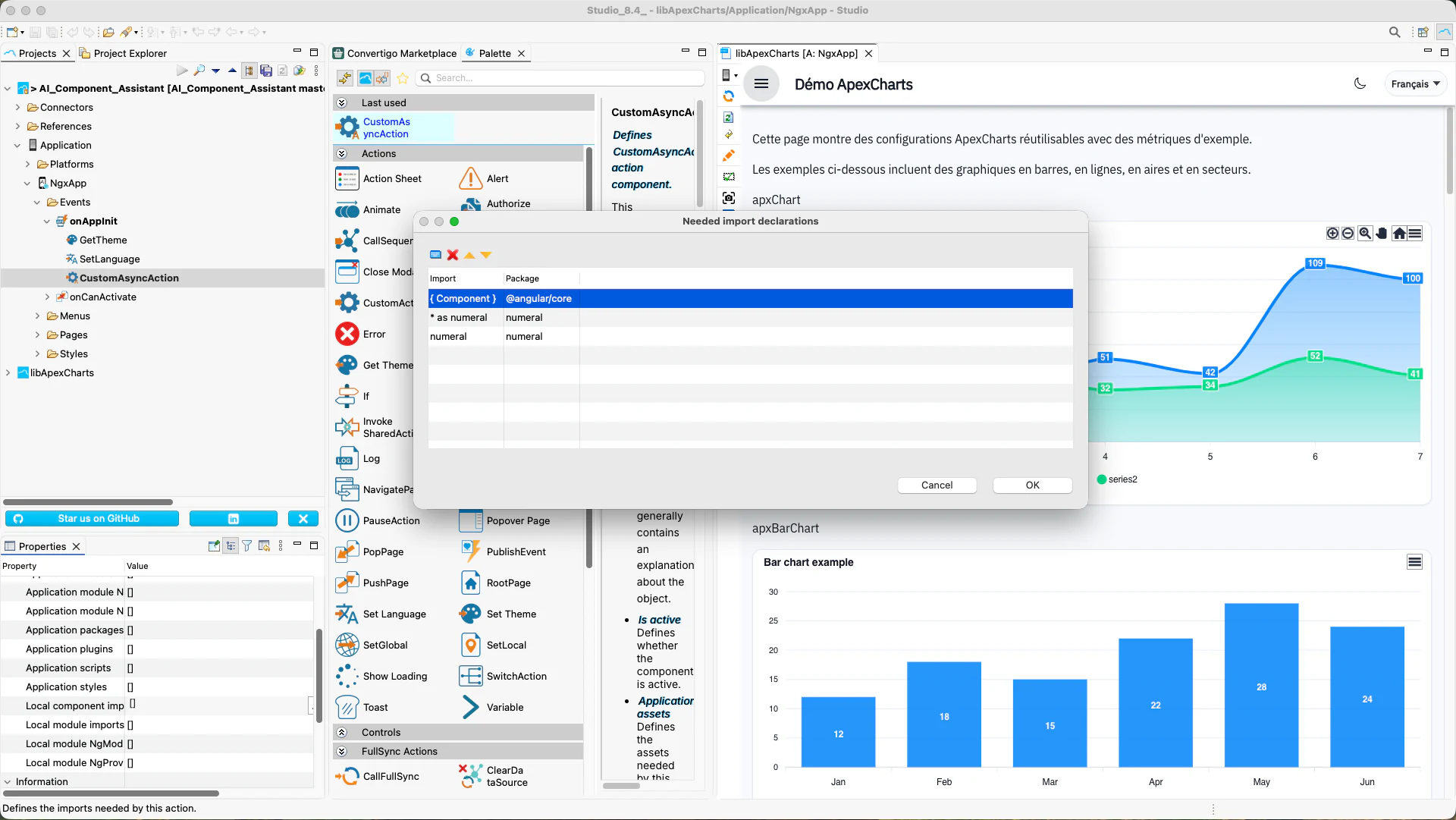
We upgraded NGX code generation to support direct import syntax, including modern default-import patterns expected by the latest Angular build toolchains. This addresses friction points where generated code previously needed manual import adjustments for third-party libraries such as numeral.
With this update, we have aligned generated artifacts with current Angular conventions so your projects compile more cleanly from day one and stay easier to maintain as your front-end stack evolves.
Your teams reduce manual post-generation edits, accelerate build reliability, and ship modern Angular applications with less technical cleanup.
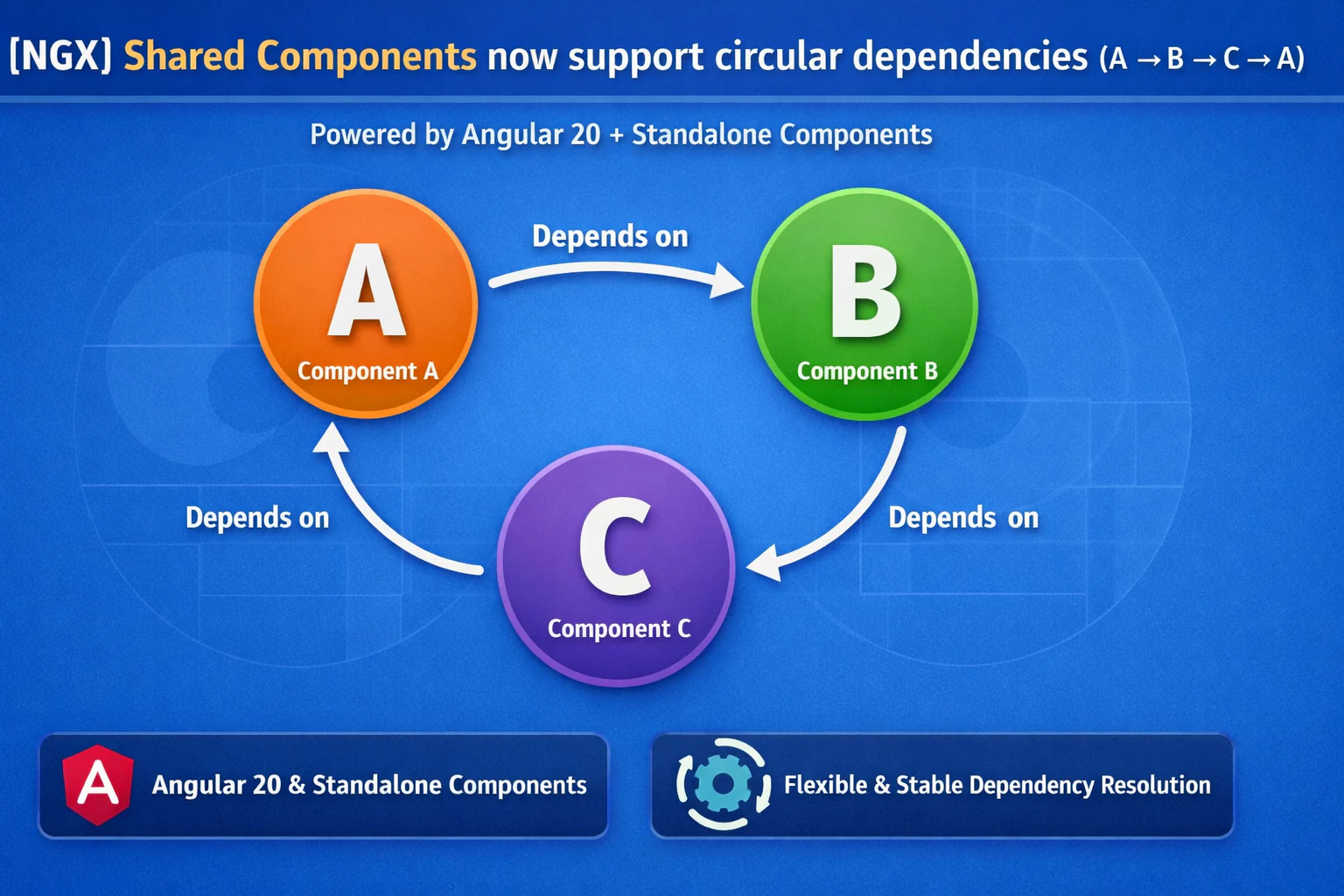
Shared Components can now be safely used in circular dependency chains (e.g., A → B → C → A).
This is enabled by the migration to Angular 20 and the adoption of Standalone Components.
By removing the rigid NgModule hierarchy and allowing components to declare their own imports, Angular’s modern compiler can resolve more flexible dependency graphs without build failures.
This improves architectural flexibility while maintaining stability.
Every new 8.4 project now starts with a default Tailwind theme, giving teams a polished visual baseline from the very first run.
Instead of beginning with a blank styling layer, new projects look better immediately and stay visually consistent as features grow.
You accelerate onboarding, cut setup friction, and ship more attractive applications from day one.
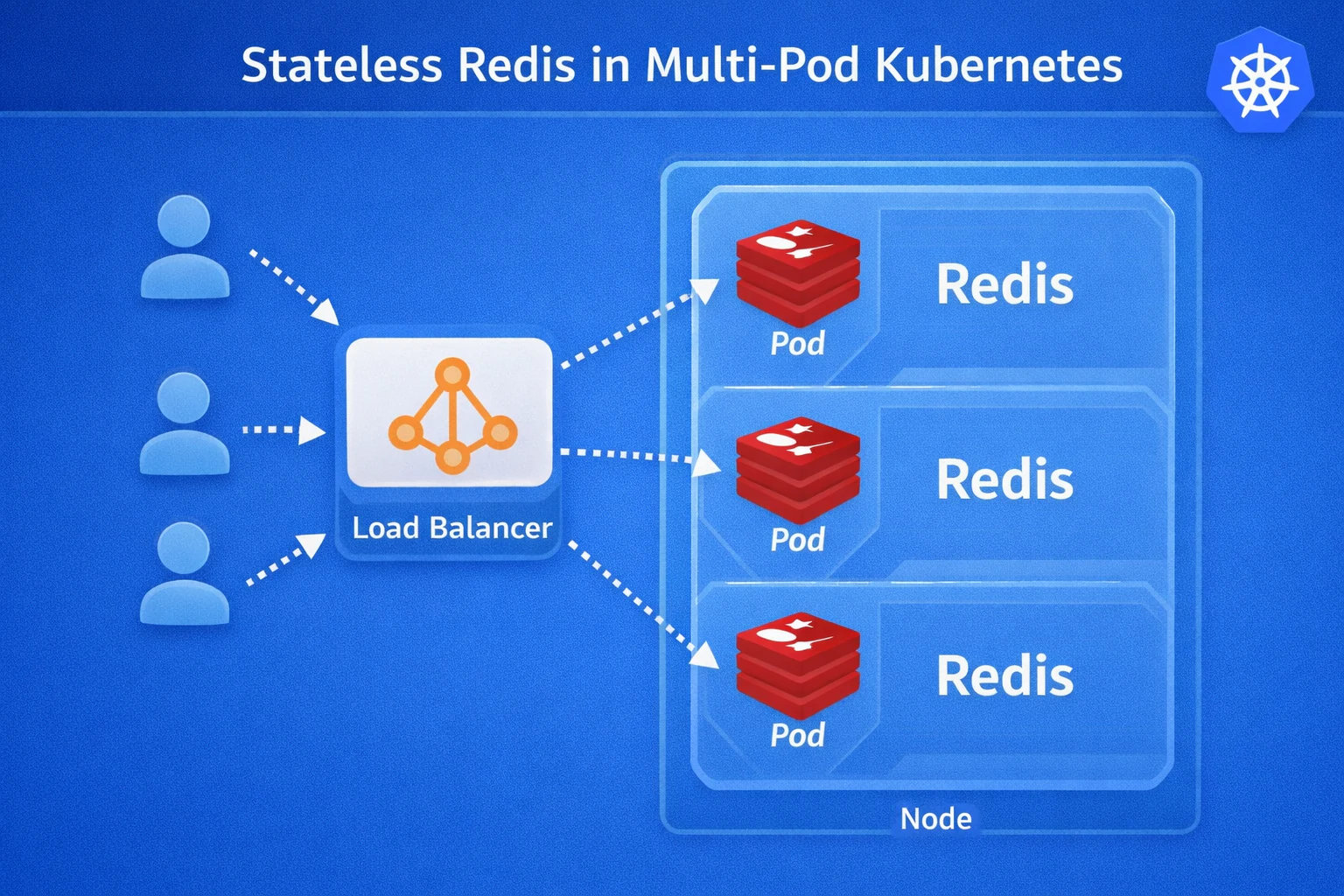
We introduced Redis-backed stateless session mode so multiple Convertigo Engine nodes can share the same session state without relying on sticky sessions. This removes a major scaling constraint for high-availability and elastic runtime topologies.
With centralized session persistence, we have enabled smoother rolling upgrades, stronger fail-over continuity, and greater flexibility with standard L4/L7 load balancers and reverse proxies.
You can scale horizontally with higher resilience, protect active user sessions during node changes, and make this architecture especially effective for Kubernetes autoscaling deployments.
We improved routing so applications can be served directly from a root domain such as https://my.domain.com, instead of relying on long technical paths like https://my.domain.com/convertigo/projects/myapp/DisplayObjects/Mobile.
This removes strict URL structure assumptions in integrations and makes reverse-proxy, gateway, and SDK-based deployments much easier to configure in real enterprise infrastructures.
You can expose cleaner root-domain URLs, simplify production routing, and reduce complexity across deployment and automation workflows.
We rebuilt the Administration Console to modernize the user experience and simplify long-term front-end maintenance. This redesign improves rendering efficiency and creates a cleaner interaction model for daily operational tasks.
By moving to a modern component architecture, we have made the admin surface faster, easier to evolve, and more resilient for future releases with growing operational needs.
You get a more responsive console, better usability under load, and a maintainable foundation for ongoing platform administration improvements.
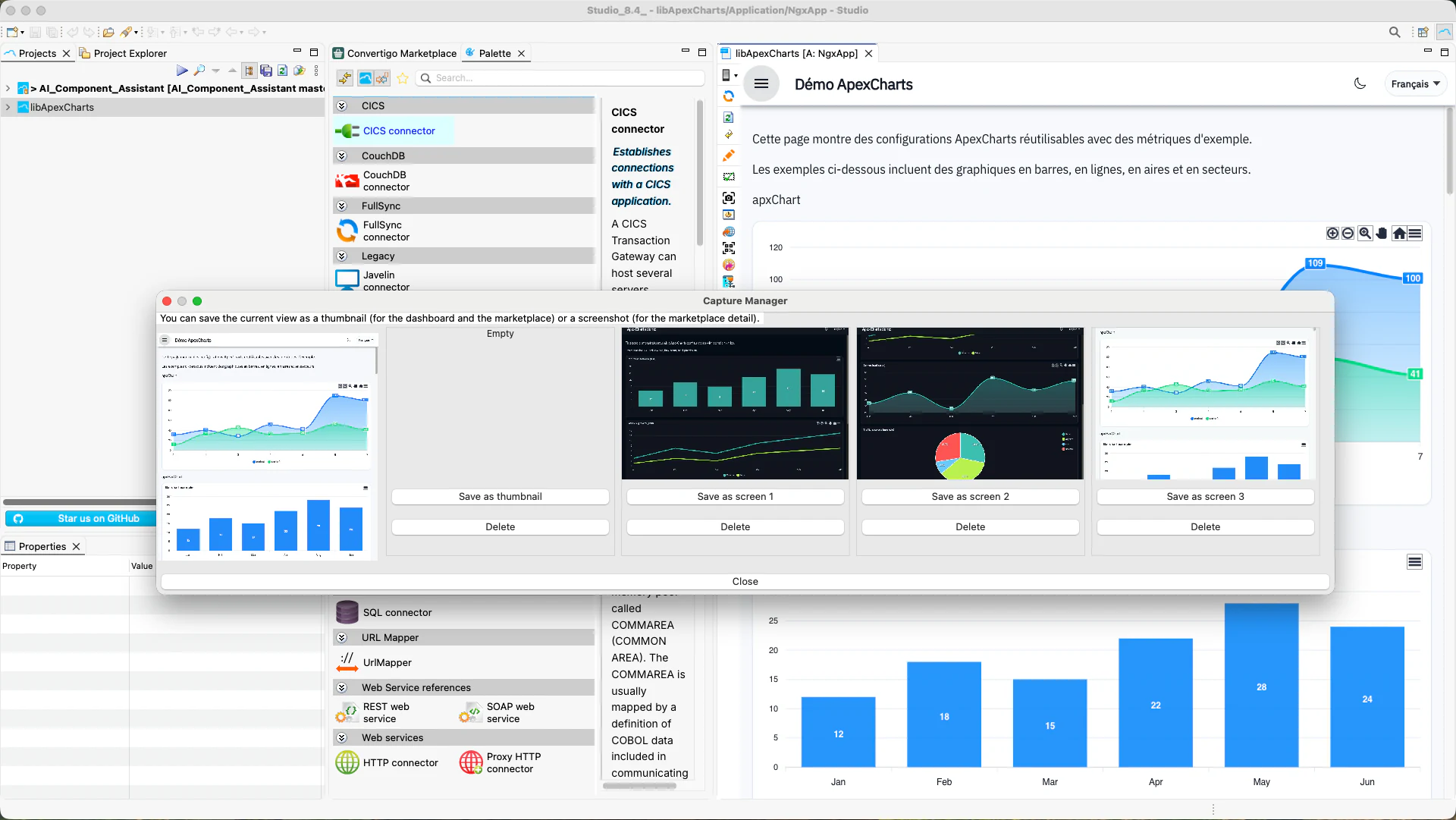
We enabled Studio to capture screenshots and generate thumbnails from NGX applications directly in the builder workflow. This delivers a built-in visual publishing path for catalog pages, internal dashboards, and Marketplace presentation assets.
When no thumbnail is manually selected, automatic generation helps maintain a consistent visual baseline, reducing documentation and release friction for teams shipping many apps or modules.
You showcase apps with production-ready visuals faster, improve discoverability, and streamline release communication across stakeholders.
Improvements (8.4.0)
The key improvement details and outcomes are shown in the cards below.
We added support for Angular standalone application generation so components can import their dependencies directly without heavy NgModule-centric structures. This follows current Angular best practices for simpler code organization.
The new generation model improves modularity, supports easier lazy loading patterns, and brings a major productivity gain in Visual Builder with up to 10x faster app rebuild and refresh cycles.
You can deliver cleaner Angular apps with lower structural overhead, up to 10x faster Visual Builder feedback loops, and runtime performance improvements of up to 30%.
We improved import generation rules so pages and components include only the dependencies they actually need, instead of recursively importing full chains of nested dependencies.
This refinement produces cleaner source files, lowers code noise in generated artifacts, and keeps dependency boundaries easier to understand and maintain.
You work with leaner generated code, reduce build complexity, and spend less time cleaning unnecessary imports.
NavParams Deprecation AddressedWe updated NGX generation patterns to move away from deprecated Ionic NavParams usage and align with Angular input-based data flow patterns.
This keeps generated applications compatible with the current Ionic and Angular ecosystem while reducing technical debt tied to legacy APIs.
You get stronger framework compatibility, fewer migration blockers, and longer lifecycle stability for mobile app projects.
We improved Studio feedback while Mobile Builder runs by exposing a dedicated task and a clearer status line, including better visibility during NGX standalone builds.
This gives development teams clearer runtime signals during build phases and reduces ambiguity about current build state and progress.
You troubleshoot faster, coordinate build workflows more confidently, and reduce lost time caused by unclear build feedback.
We consolidated static file serving into a single shared handler and added robust HTTP Range support with proper partial-content behavior.
The new model improves streaming efficiency, standardizes cache-related headers, and delivers more predictable file transfer behavior for large assets and media workloads.
You get faster, more reliable static delivery with standards-compliant partial downloads and better client-side performance behavior.
We updated critical platform bases across Eclipse, Tomcat, JVM, Node.js, and key third-party layers to align Convertigo with current enterprise standards. This refresh strengthens both development and runtime reliability.
Keeping core dependencies current reduces compatibility gaps and shortens the distance between your applications and the supported ecosystem baseline.
You benefit from improved security posture, stronger platform stability, and smoother compatibility with modern infrastructure and developer tooling.
We replaced legacy finalize()-based cleanup with cleaner-backed resource management for key engine components. This aligns the platform with modern JVM recommendations and improves reliability of fallback cleanup paths.
By combining explicit release behavior with safer fallback mechanisms, we have reduced the risk of long-lived resource leaks in connector and requester lifecycles.
You gain more predictable resource handling, fewer deprecation risks, and stronger runtime stability on modern Java versions.
__nocache=true without cache purge.__nocache=true Cache BehaviorWe fixed cache manager behavior so requests using __nocache=true no longer delete the previous cached result before recomputation begins.
This preserves fast responses for other consumers while allowing controlled cache refresh flows, such as scheduled warm-up jobs.
You can refresh expensive computations without sacrificing responsiveness for concurrent users relying on existing cached data.
We harmonized Marketplace and Administration button patterns in Studio to deliver a cleaner, more premium, and more coherent interface.
Action controls now feel consistent across views, reducing visual friction and making day-to-day navigation more intuitive for operators.
You get a smoother Studio experience, stronger UX confidence, and faster execution in operational workflows.
eval From Generated TypeScriptWe removed eval usage from generated TypeScript to align generated output with modern security and quality expectations. This update supports safer execution models and cleaner static analysis.
By eliminating dynamic evaluation patterns in generated code, we have reduced avoidable security review friction and improved policy alignment for enterprise environments.
You gain safer code generation, easier CSP compliance, and smoother security validation during audits and production rollout.
We cleaned Swagger output by removing the obsolete Switch to Swagger definition (oas2) link from generated YAML views.
The API console is now clearer and more focused on current documentation paths, with less noise for teams integrating services.
You present a more professional API experience and help consumers find the right documentation faster.
We disabled automatic ZIP backup creation during deployment by default, reflecting modern Git/CI-based delivery practices where project history and rollback are already managed externally.
This eliminates unnecessary filesystem overhead during deployments and reduces side effects on runtime hosts.
You deploy faster, consume less disk space, and simplify runtime operations in production and CI/CD pipelines.
We harmonized bean descriptor conventions and note handling rules so documentation renders consistently across Studio, web output, and Jekyll pipelines.
This work standardizes authoring expectations and improves how notes, markdown, and formatted descriptions appear across all documentation channels.
You get cleaner documentation outputs, fewer formatting regressions, and a more reliable authoring process for technical teams.


